Product Overview
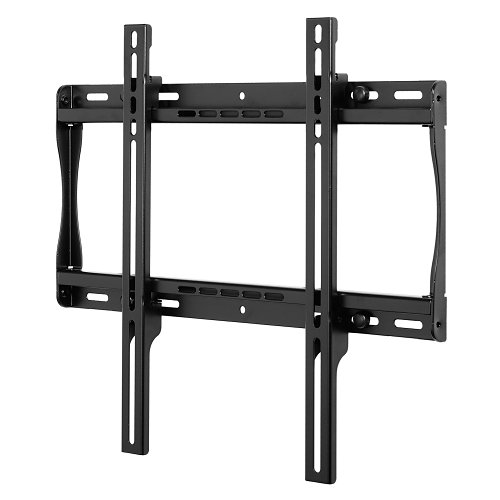
The SmartMount® Universal Flat Wall Mount series offers the most versatile installation features and mounting options. Horizontal and vertical adjustment abilities allow for post installation leveling and side-to-side positioning, making it easier than ever to find the perfect TV position. The SF640(P) models' low-profile design offers the sleek, aesthetically pleasing look to fit into any décor. Security screws provided in the SF640 models deter tampering and theft. The open wall plate design offers total wall access, increasing the electrical and cable management options. The display can now simply be installed by a single person with the Hook-and-Hang™ system. The Easy-Glide™ adaptors hook onto the wall plate for an overall quick, simple, and secure installation.
General Information
Name : Peerless-AV SF640 SmartMount Universal Flat Wall Mount for 32" to 50" Displays, Security Models , Peerless-AV
Category : Pro Display Accessories & Mounts
UPC Code : 735029235651
Country of Origin : Taiwan, Province of China. Country of origin is subject to change.
Specifications
General Information
ADI Part Number : QP-SF640
Brand Name : Peerless-AV
Manufacturer : Peerless Industries, Inc
Manufacturer Part Number : SF640
Packaged Quantity : 1
Product Line : SmartMount
Product Model : SF640
Product Name : Universal Flat Wall Mount
Product Series : SF640
Product Type : Wall Mount
Technical Information
Device Supported : Flat Panel Display
Maximum Load Capacity : 150 lb
Physical Characteristics
Color : Black
Depth : 1.2"
Height : 16.9"
Width : 19.4"
Product Information
Maximum Screen Size Supported : 50"
Minimum Screen Size Supported : 32"
Number of Displays Supported : 1
Warranty
Limited Warranty : 5-Year
Miscellaneous
Compatibility : LCD and Plasma Screens
Country of Origin : TW
Environmental Certification : RoHS
Environmentally Friendly : Yes
Features : Adjustable, Anti-theft, Cable Management
Package Contents : <ul> <li>Universal Flat Wall Mount</li> <li>Wall and Display Installation Hardware</li> <li>Installation Instructions</li> </ul>