

Contenu chargé
Veuillez vous connecter pour voir les tarifs, consulter la disponibilité des produits et ajouter des articles à votre panier.
Aperçu
Spécifications
Documents
Aperçu
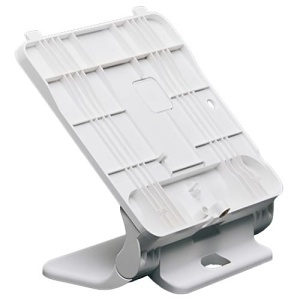
The Qolsys IQ5ST Adjustable Angle Table Stand is an official mounting accessory designed for the Qolsys IQ5 Series, including the IQ Panel 5, IQ5 Hub, and IQ5 NS. It provides a stable tabletop mounting option for installations where wall mounting is not practical or preferred. The IQ5ST allows the panel or hub to be placed on a desk, counter, shelf, or tabletop while maintaining a clean and professional appearance. Its adjustable angle design makes it easy to position the screen for comfortable viewing and touch interaction. This is especially useful in offices, reception areas, bedrooms, or other locations where flexible placement is important. This stand is designed to work seamlessly with the IQ5 Series mounting interface and form factor. It supports proper cable routing so power and network connections remain organized and unobtrusive. This helps reduce cable strain and keeps the installation neat, even when the system is placed in a visible location. Because the IQ5ST is an official Qolsys accessory, it does not interfere with system operation or wireless performance. It maintains full compatibility with built-in radios such as PowerG+, Z-Wave, Bluetooth, cellular, and Wi-Fi. Whether the system is being used with Alarm.com services or as part of a broader smart home setup, the stand allows the device to function exactly as intended. The IQ5ST is a practical solution for users who want placement flexibility without committing to a permanent wall installation. It works well in residential environments and light commercial applications, providing a simple and reliable way to position an IQ5 system where it is easiest to see and use.
Principales caractéristiques
- Bluetooth 5.0 + LE: Supports streamlined device pairing and smart ecosystem integration
- Enhanced Functionalities: Future-proof technology enables upcoming AI-driven features and expanded smart device integrations
- Easier Installation: Refined hardware design including improved power supply, tamper detection, and backplate that supports smoother installs and improved performance
Renseignements généraux
Name: IQ IQ5ST IQ Panel 5, IQ5 HUB, IQ5 NS Stand
Category: IQ, Smart Home, Intrusion, Smart Home Accessories, Intrusion Accessories
UPC Code:
Country of Origin: Mexico. Country of origin is subject to change.
Spécifications
ADI Numéro du produit Q9-IQ5ST Code fabricant IQ5ST Gamme IQ Panel 5 Marque IQ Modèle de produit Support IQ Type de produit Mounting Bracket
Couleur White
Type de montage Desktop Mount Type d'installation Commercial, Residential
Compatibilité IQ Panel 5, IQ5 Hub, IQ5 NS