

Contenu chargé
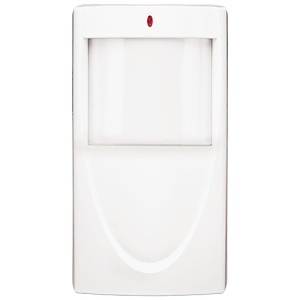
Napco GEMC-BSLC-PIR Motion Detector, Range 50'x50'
GEMC-BSLC-PIR
|NA-CBSLCPIR
Acheter Napco Security Technologies
Napco GEMC-BSLC-PIR Motion Detector, Range 50'x50'
GEMC-BSLC-PIR | NA-CBSLCPIR
Veuillez vous connecter pour voir les tarifs, consulter la disponibilité des produits et ajouter des articles à votre panier.
Aperçu
Spécifications
Documents
Aperçu
Networx series door locks contain an integral radio that communicates with an intermediate device called a Networx Gateway module. In a conventional Networx system, this Gateway module is connected to a computer network, allowing a Windows PC connected to the network to control and program all Networx series door locks with DL-Windows software. The AL-IME-USB Portable Gateway provides full Networx Gateway functionality without the need for a network connection. Simply insert the USB Gateway into your PC or laptop USB socket, and you can quickly create a wireless connection to your Networx door locks, with all data routed through the USB Gateway. In addition, the USB Gateway can be used in an existing system with standard Networx Gateways. The USB Gateway is a flexible device. No data is stored within the USB Gateway itself, and therefore a single USB Gateway can be switched seamlessly between computers running DL-Windows and even between DLWindows Accounts (the USB Gateway is automatically provided with the necessary lock data from DL-Windows each time communications are initiated with locks). Note: Only "Local" Emergency Commands are supported when using an USB Gateway as your primary means of communicating with your locks. If no standard Networx Gateways are used in your system, Emergency Commands can only be initiated by a pre-programmed Wireless Remote Release (not with DL-Windows). For more information about Emergency Commands, see the DL-Windows User's Guide (OI382) and the DL-Windows for Networx User's Guide (OI383).
Principales caractéristiques
- The GEMC-BSLC-PIR-L features a low-current, addressable Passive Infrared (PIR) motion sensor
- This wide range makes it suitable for large commercial spaces, providing comprehensive motion detection for enhanced security
- The device utilizes Addressable Signaling Line Circuit technology, enabling precise identification and communication with individual devices on the security network
- The GEMC-BSLC-PIR-L is built to meet the stringent requirements of commercial environments
- One GEMC-BSLC Addressable SLC Burg Module has the capacity to support up to 116 detectors devices
- PIR Motion sensor is engineered for accuracy in motion detection, reducing the likelihood of false alarms
Renseignements généraux
Name: Napco GEMC-BSLC-PIR Motion Detector, Range 50'x50'
Category: Napco Security Technologies, Intrusion, Motion & Perimeter Sensors, PIR Motion Sensors
UPC Code: 785026089993
Country of Origin: Dominican Republic. Country of origin is subject to change.
Spécifications
ADI Numéro du produit NA-CBSLCPIR Code fabricant GEMC-BSLC-PIR Marque Napco Security Technologies Pays d'origine DO Série de produit Gemini Type de produit Passive Infrared Detector